
書く Write
思いつきも、まとめた考えも。気軽に書き留める Quick thoughts and refined ideas — capture both
Clone+ は、その学び方を根本から変えるメモアプリ。 Clone+ is a note app that changes how you learn.
「私たちは、間違って学んでいた」── そう言われて、あなたはどう感じるでしょうか。 “We've been learning the wrong way” — how does that strike you?
反発するかもしれません。あるいは、心のどこかで「ああ、やっぱり」と頷いたかもしれません。 You might push back. Or somewhere inside, you might feel: I already knew.
学校で教わった「覚える」「整理する」「まとめる」という学習法は、たしかに役に立った時代がありました。けれど、いまの時代には、もう足りないのです。 The way we were taught — memorize, organize, summarize — worked for an earlier age. It no longer keeps up.
スマートフォンを開けば情報が押し寄せ、本は積まれ、動画は尽きない。数百年前の人が一生で触れた情報量よりも、私たちは1日で多くを目にしています。 Open your phone, and information floods in. Books pile up. Videos never end. In a single day, we encounter more than someone centuries ago would in a lifetime.
そんな濃度の中で、「ノートに記録する」「フォルダで整理する」だけでは、知識は流れ落ちていく。 In that flood, “writing notes” and “sorting them into folders” isn't enough. Knowledge slips through.
ノートやフォルダをきれいに整理しているのに、知識が定着しない Your notes and folders are neatly organized, but the knowledge doesn't stick
メモを取ったはいいが、書いただけで結局見返さない You take notes, but only write them and never look back
知識は増えているはずなのに、いざという時に使えない Your knowledge keeps growing, but it's never there when you need it
本や動画を“見ただけ”で終わってしまう You just "watch" books and videos — and nothing more
疑問が出てもすぐ検索して満足し、深く考えなくなる Every question gets a quick search, so you stop thinking deeply
その原因は、あなたの能力ではありません。
問題は、私たちが教わってきた「メモの取り方」そのものにあります。 It's not about your ability. The problem lies in how we were taught to take notes.
「ノートはきれいに整理しなさい。カテゴリで体系化しなさい。」── 私たちが教わってきた、この当然のような方法。けれど、これこそが知識を無駄にしている犯人かもしれません。 “Keep your notes neat. Sort them into categories.” — that's how we were taught, and it sounds perfectly reasonable. Yet this habit may be what's wasting your knowledge.
人間の脳は、コンピュータのようにフォルダで情報を扱ってはいません。記憶はネットワーク型で、複雑に絡み合い、予期しない組み合わせからアイデアが生まれます。 The human brain doesn't sort information into folders the way a computer does. Memory is a network — strands that overlap and tangle, and ideas emerge from unexpected combinations.
たとえば、あなたがプログラミングを学んだとします。「プログラミング」フォルダに入れて終わり。けれど、プログラミングで磨かれる手順を分解し、組み立て直す力は、料理の段取りにも、文章の構成にも、プロジェクトの計画にも、まったく同じ形で活きるはずです。カテゴリ分けした瞬間に、その繋がりは見えなくなるのです。 Say you study programming. Old habit: file it under “programming” and move on. But the ability to break things apart and rebuild them — sharpened by programming — works just as well for planning a meal, structuring an essay, scheduling a project. The moment you file it away, the connections become invisible.
知識はあるのに、使えない。学んでいるのに、成長の実感がない。── その正体は、整理という名の断絶かもしれません。 You have the knowledge — but you can't use it. You're learning, yet not growing. The real culprit may be the separation called “organization.”
— 答えは、すでに在った — The answer already exists
20世紀後半のドイツに、ひとりの社会学者がいました。名を、ニクラス・ルーマン。 In post-war Germany, there lived a sociologist named Niklas Luhmann.
40年。彼が遺したのは、約9万枚のメモと、70冊を超える著作、そして400本以上の論文。その驚くべき量の仕事を支えたのは、突き抜けた才能ではありません。彼が持っていたのは、ある「仕組み」でした。 Over forty years, he produced about 90,000 notes, more than 70 books, and over 400 papers. That extraordinary output came not from raw brilliance, but from something else entirely: a system he had built.
学んだことを、忘れない仕組み。一度書いたメモを、必要な瞬間にもう一度呼び戻せる仕組み。それが、Zettelkasten。ドイツ語で「メモ箱」を意味します。 A system for not forgetting what he had learned. A system that let him pull any note, in any moment, back into the conversation. He called it the Zettelkasten — German for “slip box.”
原則はシンプル。1枚に1テーマ。書いたら、関連するメモへリンクを引く。たったそれだけで、バラバラだった記録が動き出し、点と点がつながり、知識の地図が育っていきます。 The rules are simple. One idea per note. As you write, draw a link to any related note you've already kept. That's all it takes for scattered records to start moving — point connecting to point, until a map of your own knowledge begins to grow.
1枚1テーマで、小さく書く One idea per note, kept small
関連するメモ同士を、明示的に結ぶ Connect related notes explicitly
リンクが集まり、知識の地図が育つ Links grow into a map of knowledge
AI が情報を即座に引き出せる時代。問われているのは「どれだけ覚えているか」ではなく、「どう繋いで、何を生み出すか」です。Zettelkasten方式は、その力を育てるための、最も古く、最も新しい仕組み。 In an age when AI can pull facts in an instant, the question is no longer “how much do you remember?” but “what can you connect, and what can you create?” The Zettelkasten method is, at once, the oldest and newest answer to that question.
Clone+は、その方式をあなたの手の中に届けるメモアプリです。 Clone+ brings this method to your hand — on phone and PC.
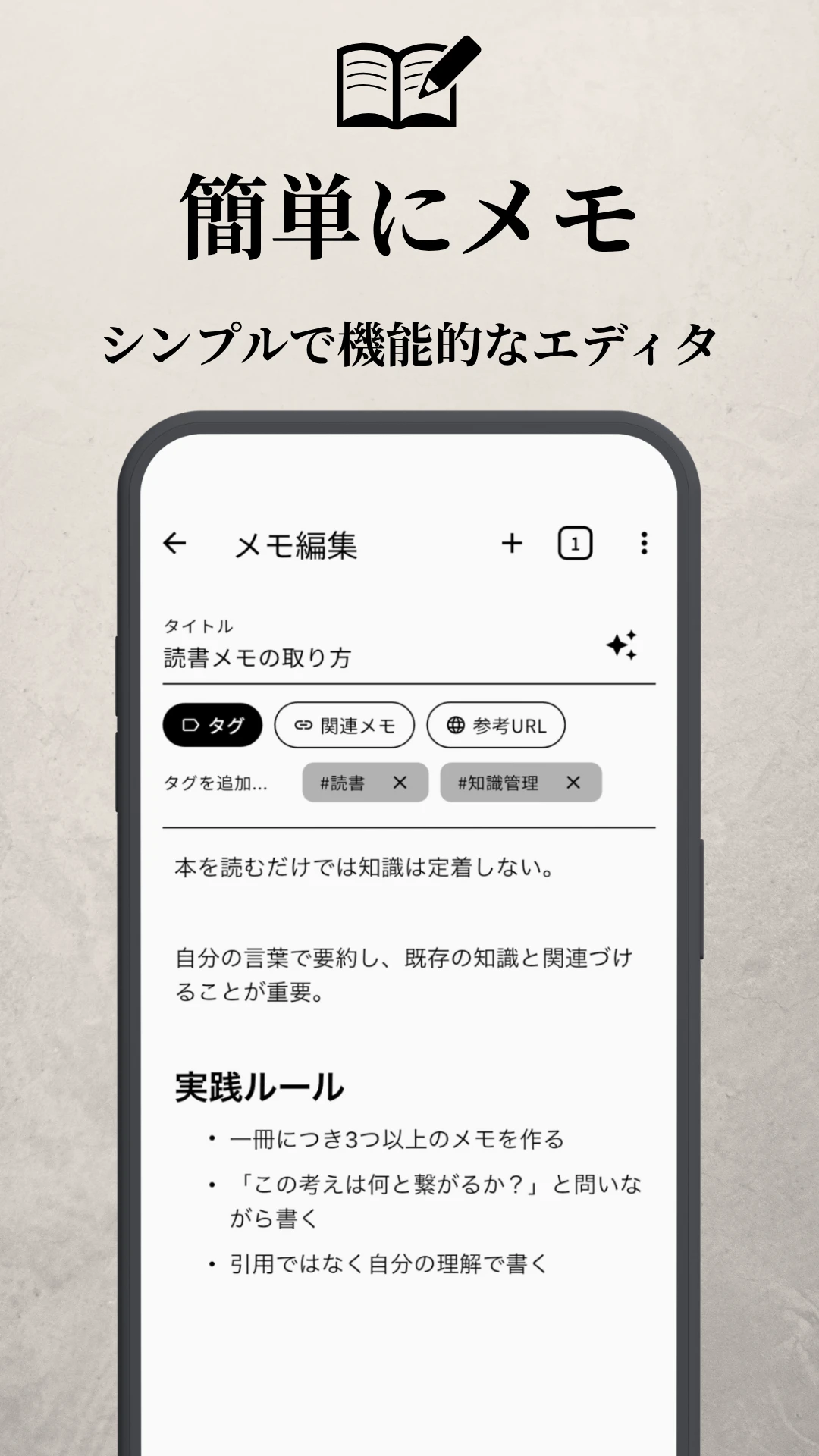
メモすることを、習慣に Make note-taking a habit
Zettelkasten 方式は、たくさんのメモを書き、つないでいくところから始まります。一つひとつの記録に時間がかかっては続きません。見出しや箇条書きなど基本的な機能は備えつつ、元に戻す・やり直し機能で書き間違いもすぐ修正できる。Clone+ のエディタは思考の流れを止めないよう、徹底してシンプルに設計されています。 The Zettelkasten method begins with many notes, written and linked over time. If each entry takes effort to format, the practice stalls. Headings and bullet lists are within reach, and undo / redo keep stray strokes reversible — so the editor stays stripped down, and the only thing that flows is your thinking.
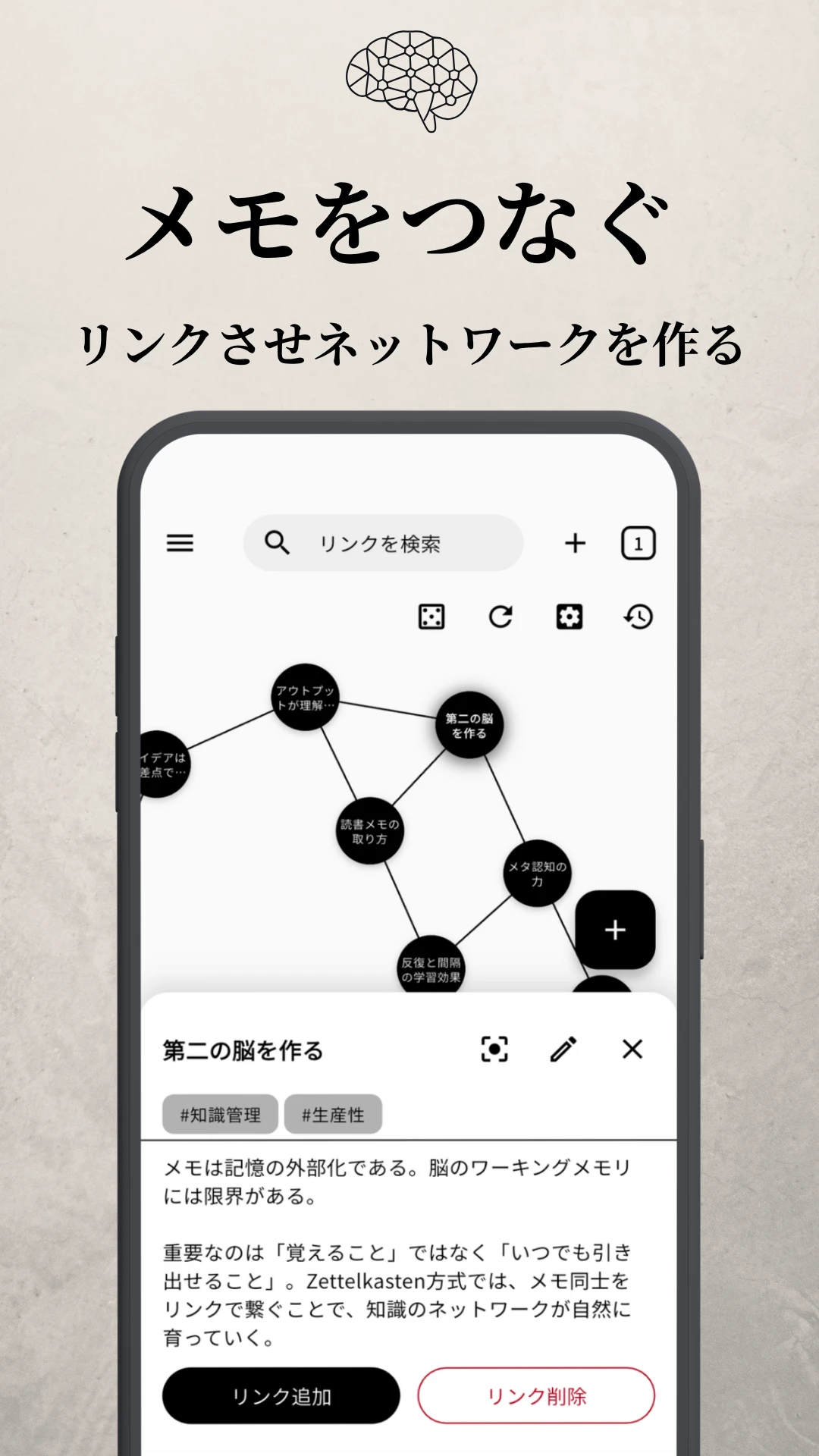
フォルダで分けるのを、やめる Stop sorting into folders
「これは何と繋がる?」と問いながら、関連するメモへリンクを引いていく。ばらばらだったメモが、ひとつのネットワークの一部に変わっていきます。 Ask "what does this connect to?" as you draw links to related notes. Scattered records gradually become part of a single network.
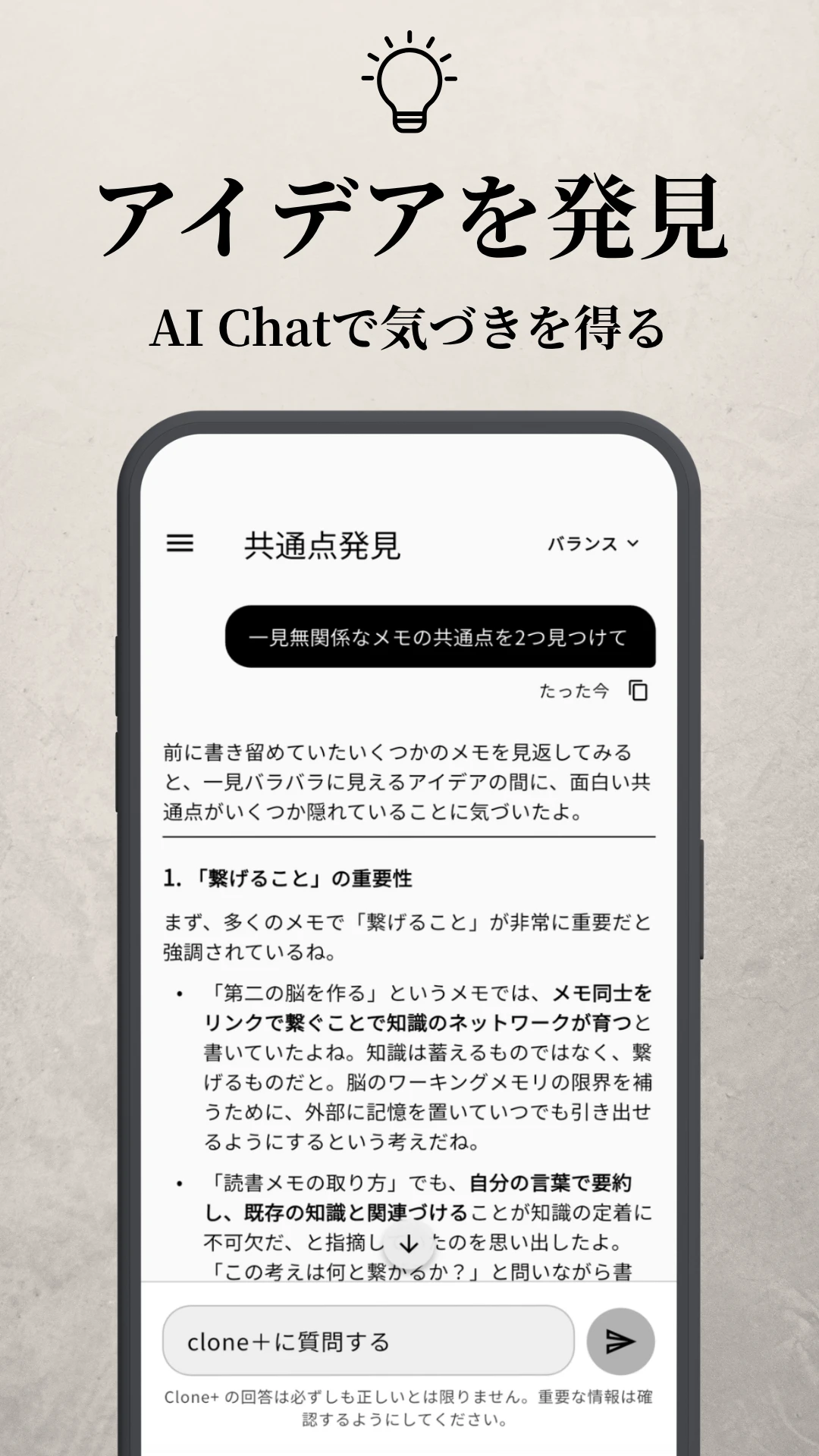
検索の、その先へ Beyond search
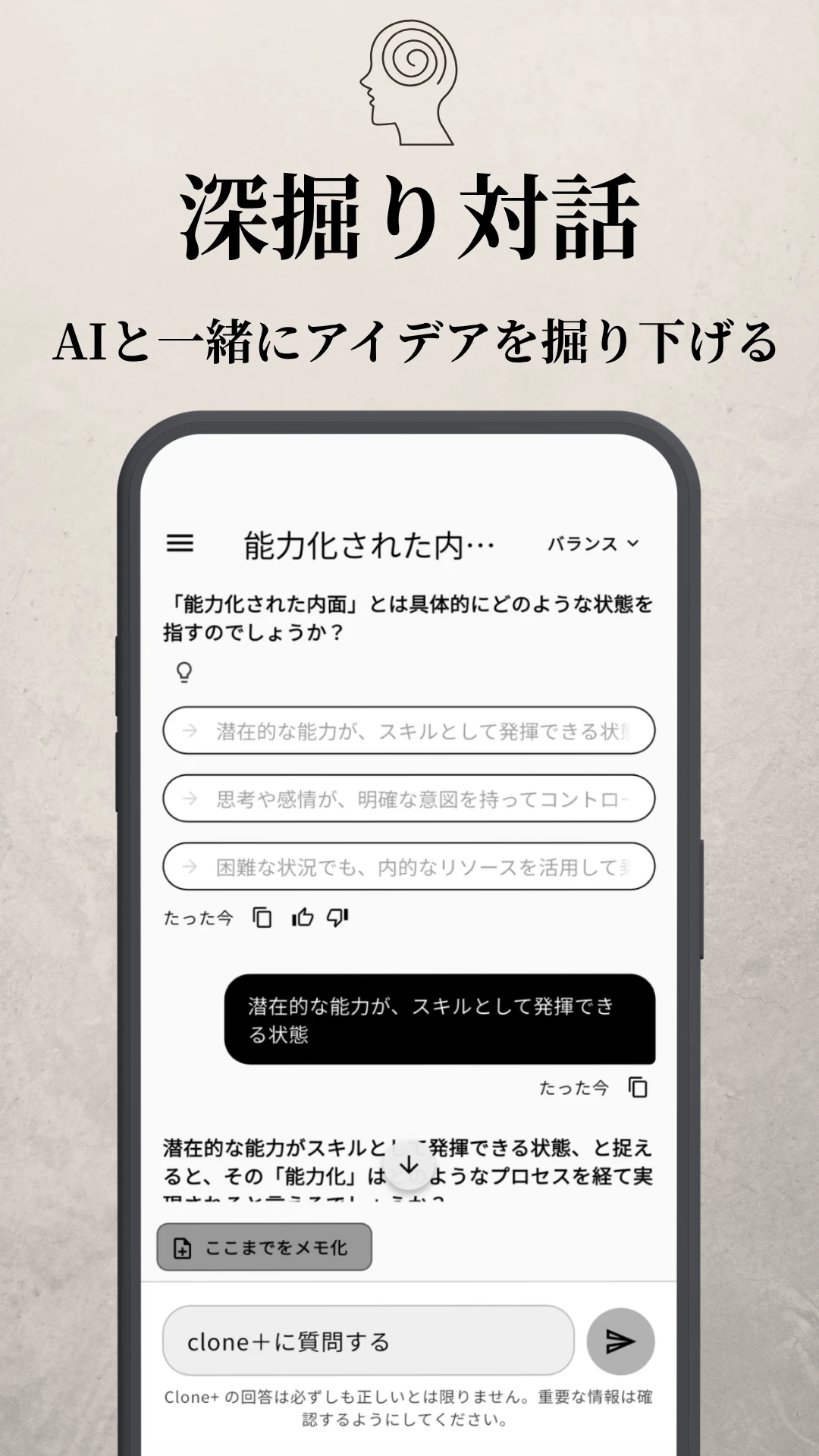
疑問が浮かんだら、チャットに問いかけるだけ。AIはメモ同士のつながりを読み取って答え、ときに新たな視点まで提示してくれます。単なる検索では届かない、書きっぱなしだった記録から、思考が動き始めます。 Just ask the chat what's on your mind. AI doesn't just retrieve past notes — it reads how they connect, and sometimes returns angles you hadn't considered. Records you once set aside start to move again.
考え続けよう Keep thinking
AIはあなたのメモから主張やテーマを抽出し、「なぜそう思ったのか」「具体例は何か」と問いかけてきます。答えを与えるのではなく、自分の考えを言葉にするきっかけを返してくれる対話。検索では届かない、自分だけの視点が見えてきます。 AI picks up the claims and themes in your notes and asks back — “why do you think so?” “what's a concrete example?” Rather than handing you answers, the dialogue helps you put your own thinking into words. A perspective no search can give — your own — comes into focus.
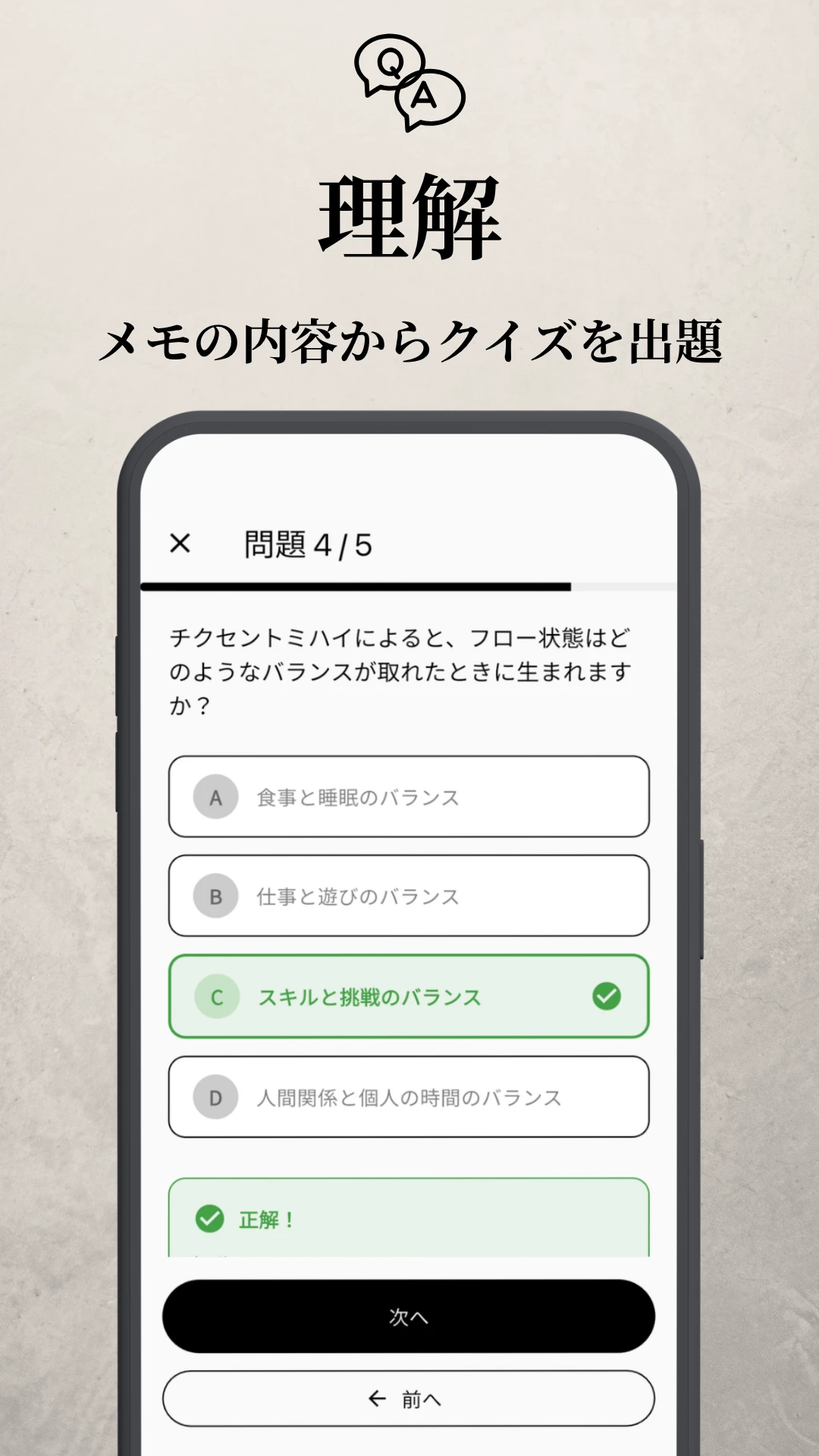
「知っている」から「使える」へ From 'I know it' to 'I can use it'
溜まったメモから自動でクイズが作られ、自分で答えることで、知識は「知っている」から「使える」へと変わっていきます。 Quizzes are generated from your notes. Answering them yourself moves knowledge from "known" to "usable."
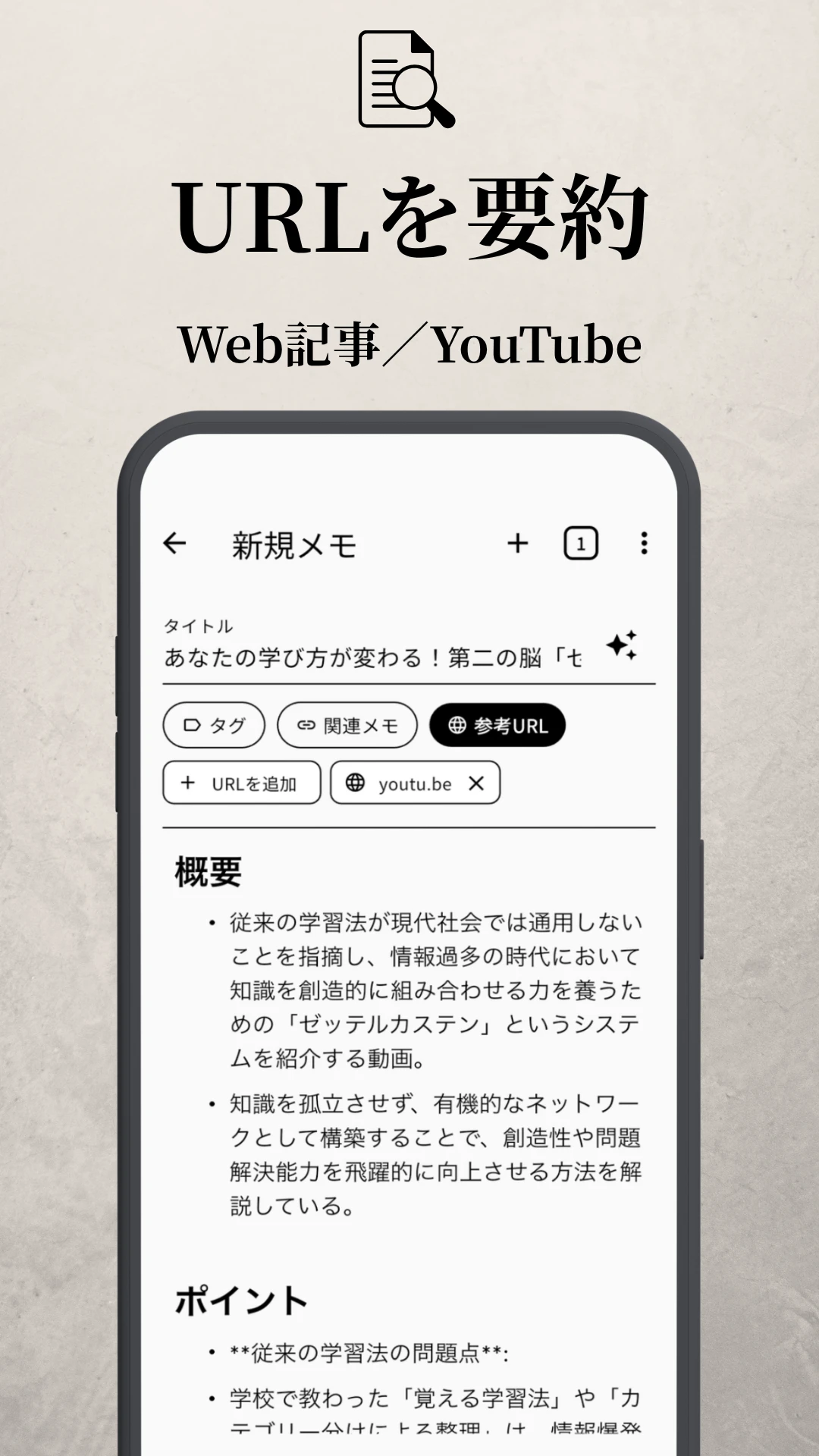
ふと触れた情報も、すぐにメモへ Capture what you find, instantly
気になった記事、見終わった動画。URLを共有するだけで、AIが要約してメモにしてくれます。書き写したり、画面を行き来する手間なく、触れたばかりの情報をサッと自分の知識に取り込めます。 An article you just read, a video you just watched. Share the URL, and AI summarizes it into a note — no copy-pasting, no app-switching. What you just consumed becomes part of your own knowledge, in a flash.
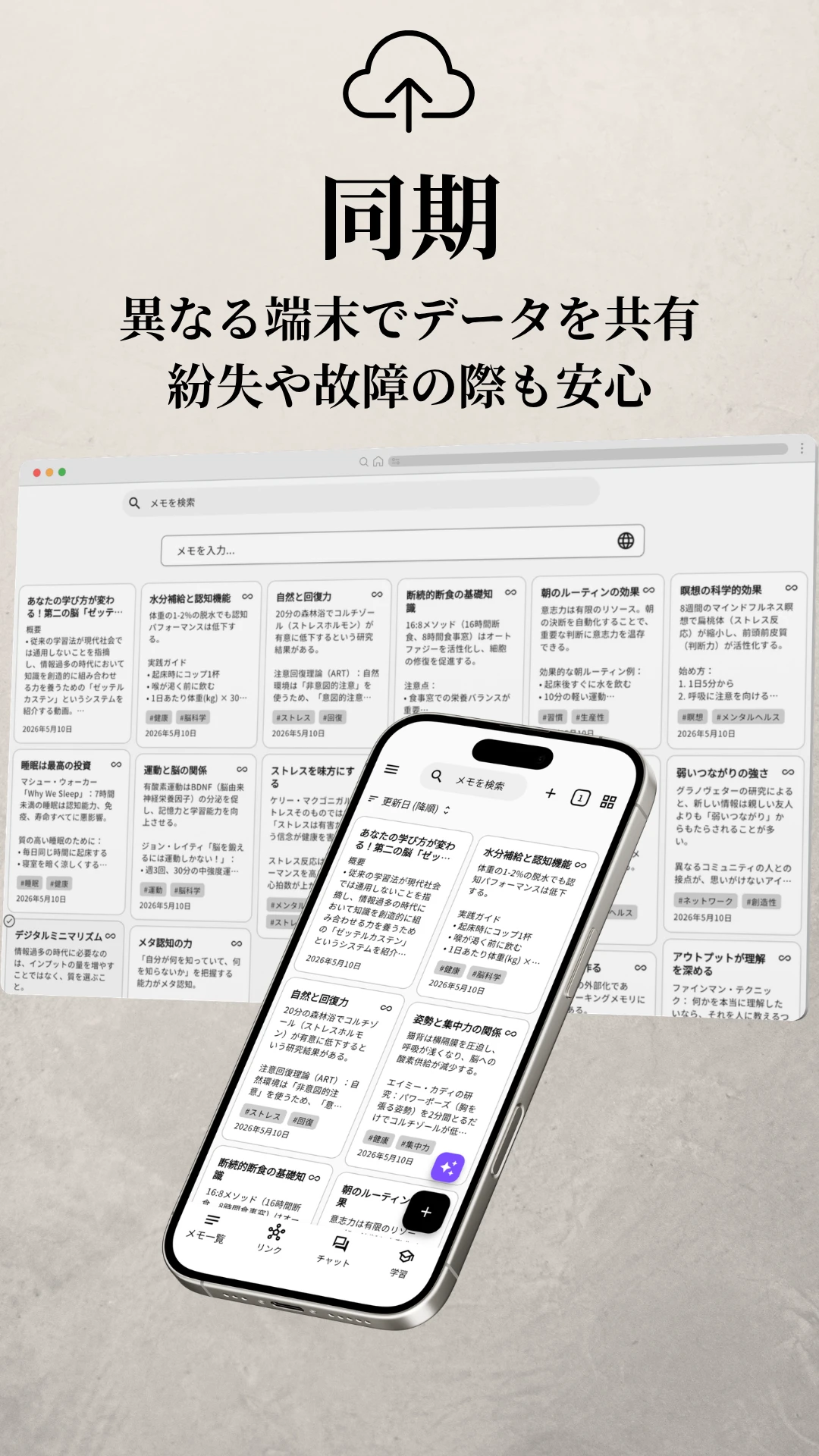
端末をまたいで、いつでも Across devices, always
PCでもスマホでも、書いた内容は自動でつながります。端末を変えても、紛失や故障があっても、メモはクラウド側に残り続けます。 What you write syncs automatically between PC and phone. Switch devices, lose or break one — your notes stay safe in the cloud.
書く → つなぐ → 見直す → 育てる → そして、また書く。このサイクルを回し続けるだけで、メモは少しずつ「使えるもの」に変わっていきます。 Write → Link → Revisit → Grow → and back to Write. Keep the cycle turning, and your notes gradually become something you can actually use.
思いつきも、まとめた考えも。気軽に書き留める Quick thoughts and refined ideas — capture both
「これは何と関係する?」と問いながら、メモ同士を結ぶ Ask "what does this connect to?" as you link
グラフで全体を眺め、AIに問いかけ、クイズで確かめる Survey with graph, ask the AI, check with quiz
気づきを足し、書き直し、新しいリンクを増やしていく Add insights, edit, draw new links over time
メモから命題を自動抽出してクラスタリング Auto-extract and cluster statements from your notes
長いメモを最小単位に分解+自動リンク Split long notes into atomic units, auto-linked
書いた内容に近いメモを、AIが提案 AI surfaces notes related to what you're writing
本文から最適な題名を生成 Auto-name from the body
グラフ上のメモをランダムに切り替え、忘れていたメモと再会 Shuffle through notes on the graph and rediscover forgotten ones
画像(JPG・PNG・HEICなど)からテキストを抽出しメモ化 Pull text from images (JPG, PNG, HEIC, etc.) into a note
PDF・Word・Excel・Markdown・テキストなどからテキストを抽出しメモ化 Pull text from PDF, Word, Excel, Markdown, and plain text files into a note
メモにタグを付けて分類・横断 Tag notes to classify and cut across them
タイトル・本文・タグから素早く探す Find by title, body, or tag — fast
ブラウザのように複数のメモを行き来 Move between notes like browser tabs
重要なメモを一覧の上部に固定表示 Keep important notes at the top of the list
残しておきたいメモを一覧から別の場所へ Move notes you want to keep out of the main list
下書きや思いつきはグラフやチャットの対象から外せる Mark drafts so they stay out of graph view and AI chat
テーマカラー10色+ライト/ダーク 10 theme colors + light/dark mode
日本語・英語・韓国語・スペイン語・フランス語・ドイツ語・ポルトガル語 Japanese · English · Korean · Spanish · French · German · Portuguese
本をよく読む人、仕事でアイデアを使う人、日々学びを積み重ねたい人。考えることを仕事や生活の軸にしている方に特に向いています。 People who read a lot, use ideas at work, or keep learning every day. Especially those whose work and life revolve around thinking.
必要ありません。「このメモは他のどれとつながるか?」と問いながら書くだけです。やっていくうちに、自然と知識のネットワークが育ちます。 No. Just ask "which other notes does this connect to?" as you write. The network grows naturally over time.
はい。1つのメモは短くて問題ありません。むしろ小さく書くことが、知識をつなげる上で重要です。 Yes. Each note can be short. In fact, keeping notes small is what makes the links between them work.
むしろ逆です。Clone+のAIは答えを与えるのではなく、あなたのメモを使って問いを返します。自分の考えを深めるための相棒として設計されています。 Actually, the opposite. Clone+'s AI doesn't hand you answers — it asks you back, using your own notes. It's designed as a partner for deepening your thinking.
AIチャット、URL要約、OCR、クイズ、関連メモ提案など、主な機能は Free でも利用できます。違いは主に次の2つです。
広告の有無:Free プランでは AI 利用上限を超えると、モバイル版は短い広告視聴で続行できます。Premium プランでは広告は表示されません。
Premium 限定の機能:より高性能な AI モデルの選択、AIタイトル自動生成、継続的なインサイト分析 などは Premium プランのみで利用可能です。
なお AI の利用量は、Free / Premium ともに 1 日あたりの上限があります(Premium の方がより多く利用できます)。 Most features — AI chat, URL summarization, OCR, quizzes, related-note suggestions — are available on the Free plan. The two main differences:
Ads: On Free, when you hit the daily AI quota on mobile, you can keep going by watching a short ad. Premium has no ads.
Premium-only features: Higher-quality AI models, AI-generated titles, and continuous insight analysis are Premium-only.
Both plans have a daily AI usage limit, but Premium's quota is significantly higher.
主な理由は、異なる端末でメモを同期するためです。Google または Apple アカウントでログインすることで、スマホでも PC でも同じメモにアクセスでき、端末の紛失や故障があっても、クラウド側にデータが残り続けます。 The main reason is cross-device sync. Sign in with Google or Apple, and your notes become accessible from any device — phone or PC. Even if a device is lost or damaged, your notes stay safe in the cloud.
メモは端末内(ローカルDB)と、お使いの Google / Apple アカウントに紐づくクラウド (Firebase) の両方に保存されます。
運営側がメモの中身を覗くことはありません。Firebase のセキュリティルールにより、本人以外のアクセスは技術的にブロックされています。第三者と共有することも、目的外で利用することもありません。
通信時・保管時とも暗号化されており、設定でAIサービスへのデータ送信のオン/オフも切り替えられます。 Notes are stored both locally on your device and in the cloud (Firebase) tied to your Google or Apple account.
Clone+ operators don't read your notes. Firebase security rules technically block access by anyone but you. We don't share your notes with third parties, and we don't use them for any other purpose.
Notes are encrypted both in transit and at rest, and you can toggle AI data sharing on or off in settings.
メモの作成・編集・閲覧は完全にオフラインで動作します。通信が回復したタイミングで、自動的にクラウドに同期されます。AI 機能(チャット・要約・URL読み取り等)は、インターネット接続が必要です。 Writing, editing, and reading notes works fully offline. Clone+ syncs to the cloud automatically when your connection returns. AI features (chat, summarization, URL fetching, etc.) require an internet connection.
※ 価格およびプラン内容は予告なく変更される場合があります。 * Prices and plan contents are subject to change at our discretion.
¥0
$10 / 月 $10 / month
※ 価格は国・地域によって異なります * Varies by country/region
バラバラだった知識が、つながっていく。 Scattered knowledge, finally connected.
無料で始める Start free